

At the end of March 2026, I was still selecting a month’s worth of daily journal notes in Apple Notes and moving them into a folder by hand. It was the last remaining chore in a process I had already tried to automate twice.
That little monthly job sent me down the Obsidian rabbit hole. I wanted Claude and Codex to see the same folders I saw and handle the boring file moves with one instruction.
Apple Notes could store my notes. Obsidian gave me plain files an LLM could work on. That was the actual reason I moved.
The monthly job I wanted to stop doing
My daily journal showed me the problem first. In Apple Notes, I started by building the page each morning. Then I made a template and copied it into a new note. Eventually I spent time building and testing a Shortcut to make the daily note for me.
The Shortcut helped, but it did not remove the maintenance job. At the end of every month, I still had to select every daily note and move it into a monthly folder. I would occasionally miss one. Then the journal was not actually where I expected it to be.
In Obsidian, I open the app and it opens today’s note. During my monthly review, I tell Claude or Codex to move the month’s daily notes into the new monthly folder. One sentence replaces the selecting and filing I used to do by hand. I glance at the folder structure afterward and it is where it should be.
That is a small task. It is also the kind of small task that quietly makes a system feel like work. I did not need another clever Shortcut. I wanted the files to be available to an assistant that could handle a bounded, boring job while I decided what mattered.
I wrote about the larger version of this in Agentic Obsidian. This is the less exciting version, and honestly the one I notice more often. A folder gets cleaned up without me selecting notes one by one.
What file access changed
The journal is the clearest example, but it is not the only one. Because the notes are files, I can ask Claude or Codex to group related ideas, sort rough notes into an article draft, or reorganize folders while I sleep. When I come back, the result is sitting in the same folder tree I already use.
I keep the judgment. An LLM can arrange the material I captured and handle the first pass. I still decide what the idea means, whether the article is worth writing and what I am willing to publish under my name.
What matters is that AI can work in the place where the rest of my information already lives. I do not have to copy notes into a chatbot, paste the answer back into another app and then remember where I put it. The source and the result can stay together.
I did not migrate my whole life
I started with three folders: Inbox, Journal and Thoughts. I did not import years of Apple Notes and spend a weekend assigning everything a new home. I set up a daily note and started using it every day.
I think in folders, not tags. I want 00_INBOX at the top and visible areas for Journal, People, Books and Health underneath it. Someone who naturally thinks in tags may build this differently. I want to glance at the sidebar and know whether the filing happened.
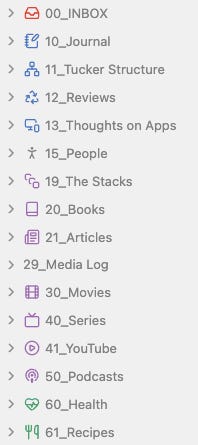
My vault has grown, but the logic has not changed. I use numbered sections for the categories I care about. It is still messy on the edges (I haven’t set an icon for my media log yet), and I am fine with that. I can make it prettier when I have time. The important part is getting the data out of my head and into a place where I can find it again.
The numbers are not a productivity method. They keep the sidebar in an order that makes sense to me. They also make the result of an LLM file move easy to check. I do not inspect every note after a monthly cleanup. I glance at the folder tree, see the month where it belongs and move on.
AI access got me interested. Portability made the switch easier to trust. My Apple Notes were tied to an Apple account and awkward for me to export. In Obsidian, I have named folders and plain files. If I change tools later, my archive does not depend on one notes app coming with me.
This fits the rule I used in The Great App Consolidation: What Happens When You Actually Cut Your Stack: each app gets a clear job. Apple Notes had become an easy capture box followed by a manual filing job. Obsidian became the place where my notes lived and where I could ask for help organizing them.
Apple Notes still wins at one thing
Apple Notes still wins the capture moment on an Apple device. I miss that. It gets out of the way fast, even if I still think the yellow is horrible.
Obsidian wins what happens afterward in my setup. Everything lands in Inbox, so I do not have to choose the final folder while the thought is still forming. I sort it later when I have time, or I ask an LLM to do the first pass.
That is the part I would keep even if I used a different notes app. A capture system that demands a folder choice at the moment of an idea is asking too much from someone trying to get out the door, finish a meeting or save a thought before it disappears. Inbox lets me capture first and make the filing decision at a calmer time.
The rule that stopped me from bouncing off Obsidian again
I tried Obsidian at least three times before this stuck. Each time, I made the same mistake: I started installing plugins and building a complicated system before I had used the basic app long enough to know what I needed.
Do not install any plugins on day one. Learn the basic functions. Use a few simple folders. Then limit yourself to one new plugin a week.
Obsidian can become a hobby very quickly. That is useful if the hobby is what you want. It is a bad trade if you only need a place for your notes to land and stay findable.
If I were starting again, my first week would be boring. I would create Inbox, Journal and Thoughts, set up the daily note and stop. I would learn how to create, move, find and link notes before installing anything. When a real problem kept showing up, I would add one plugin that solved it. Then I would wait another week.
My three failed attempts came from making Obsidian complicated before I had a problem worth solving. The version that finally stuck started with one job: open today’s note and give everything else an obvious place to land.
At the end of the month, I open my review, give Claude or Codex one sentence and glance at the folder tree when it finishes. I do not miss selecting every journal note by hand.