
A few Sundays ago I checked off four tasks I never did.
Two of them were about writing articles. One was posting to social. I tapped through all four in maybe six seconds, the app made that little completion pop sound each time (I love that sound), and my archive of finished work grew by four things that do not exist.
Here’s the part that took me a while to say out loud: I didn’t fail those tasks. I decided against them. Work got heavy, the kids had school things, and a newsletter loses to both of those every time. That was the right call and I’d make it again tomorrow.
But when I went to close out a task I had deliberately decided not to do, Todoist gave me two options and neither one was true.
Complete or delete, pick a lie
Delete loses it. Some of those ideas are good and I want them back when the week is calmer. Deleting a task is how an idea quietly stops existing.
Complete keeps it. The task moves to the archive, nothing vanishes, I can search for it later. It’s also false.
So I complete them. I’ve been doing it for years without ever really looking at it. It is the cheapest way to keep something without losing it, and the price is that my record of finished work is now mixed in with things I walked away from.
Both options destroy information. One destroys the task, the other destroys the truth about the task.
The notebook already solved this
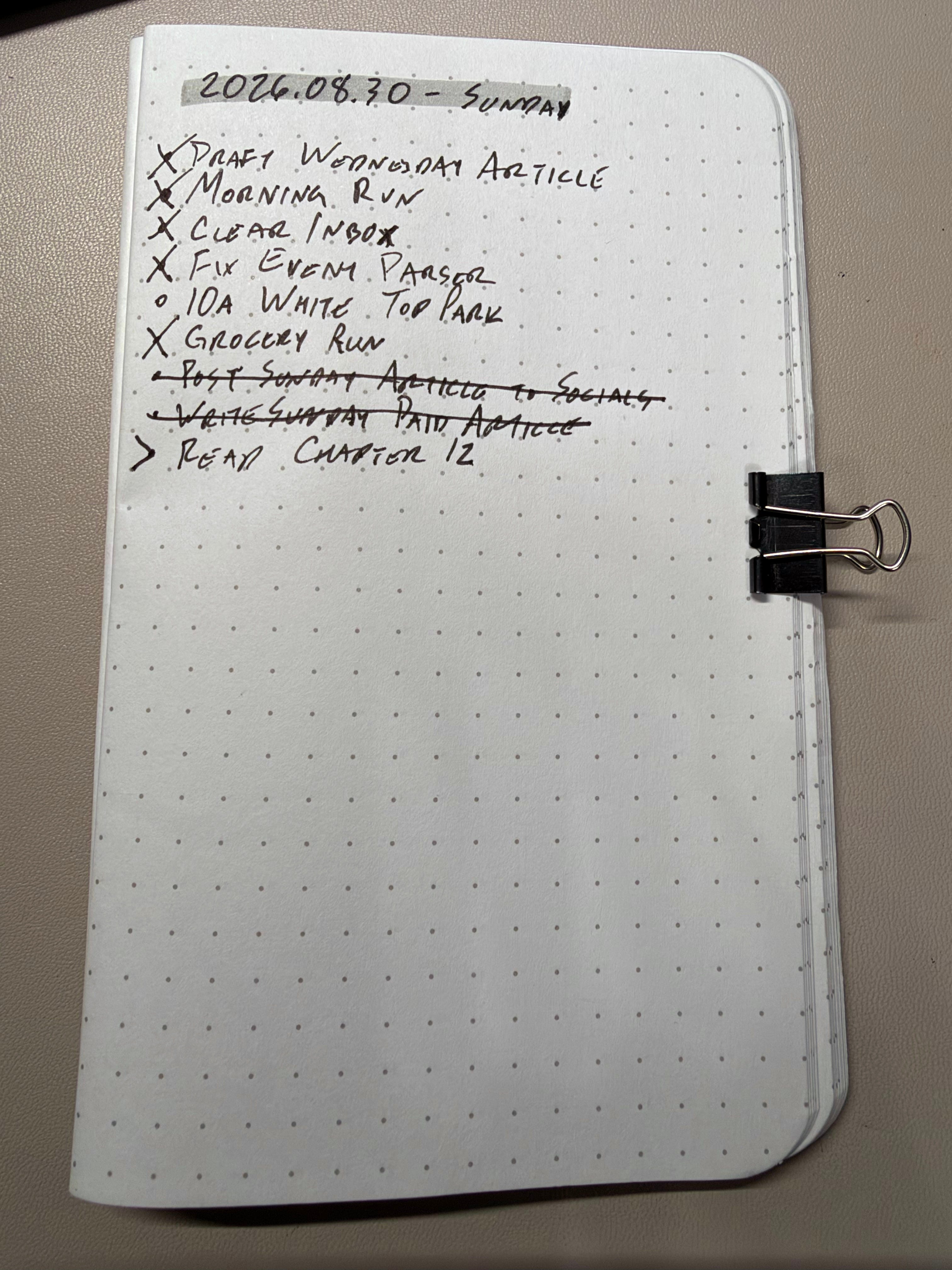
I write my tasks out by hand every morning in a paper notebook, which I’ve written about before. When I decide not to do something there, I don’t erase it and I don’t check it off.
I strike through it.
The line stays on the page. I can still read what it said. And I can tell at a glance that it was dropped instead of finished, because a struck-out line and a checked box look nothing alike.
I didn’t invent that. It’s in Ryder Carroll’s original Bullet Journal notation: an X for complete, a right arrow for migrated to a later day, and a strikethrough for a task that’s no longer relevant. Three states, on paper, sitting in a notebook that cost me a few bucks.
My task manager only has two.
Why this actually costs you something
If it were only about tidiness I wouldn’t care. It isn’t.
Your completed list is evidence. It’s the thing you look at when you’re trying to work out whether you had a productive month or you just felt busy. It’s what you check when you’re wondering why a project never moves. When “done” means both “I finished this” and “I gave up on this,” that evidence is worthless, and you won’t notice it’s worthless because it still looks like a list of accomplishments.
I only caught mine because I sat down and compared my completed tasks against articles that actually published. Four completions, zero articles.
And honestly, nothing would have caught it earlier. There’s no alert for this. The app can’t tell the difference because I never told it there was a difference. That’s the whole problem: the information was lost at the moment I tapped the checkbox, and no amount of reviewing afterward brings it back.
So the fix isn’t a better audit. It’s better notation, at the moment you decide.
Give your list a third state
You need somewhere to put “I decided not to do this” that isn’t the graveyard and isn’t the trophy case. Whatever app you use, one of these will work:
A label. Make one called Dropped or Abandoned. Apply it, then complete the task. The completion still happens (the app insists) but now it’s tagged, and you can filter your archive to exclude it or search it on purpose.
A project called Someday. Move the task there instead of completing it. This is the better option if you actually intend to revisit the idea.
A section inside the project. Drag it to a section named Not Doing. It stays visible in context, next to the work you did do, which is uncomfortable in a useful way.
None of these are clever. They just require you to spend three extra seconds being honest with yourself at the exact moment you’d rather not be.
That’s the catch. The checkbox is fast because it ends the discomfort immediately. A strikethrough leaves the discomfort on the page where you have to look at it again tomorrow.
I think that’s the point.
Disclosure: This article contains affiliate links. If you purchase through them, I may earn a small commission at no extra cost to you.