
My alarm goes off at 6:30 to get the kids up for school. Once they’re moving, I sit down at my desk, open my calendar, and write the day’s events into a pocket-size dot grid notebook with a pen. Then I open Todoist and write down the four or five things that actually have to happen. By hand. Into a notebook. Tasks that are already sitting in an app I’ve paid for since before I had a kid in middle school.
I know how that sounds.
For years I refused to do it. I wouldn’t always have paper on me, so paper felt unreliable, and I put everything in my phone instead. Calendar, tasks, notes, all of it. What I ended up with was an overloaded system I couldn’t see the bottom of, a lot of things that never got finished, and this specific frustration: the things I did finish disappeared. Checked off, gone from the list. At the end of a long day I’d look at my phone and it looked like I hadn’t done anything at all.
I haven’t missed a day of writing the page since May.
What the page actually looks like
One page per day. Down the left side, an hour spine running from 8 to 22 (that’s 10pm, a habit from a job I had years ago that I never shook). Events go in their hour slot. Under that, the must-do tasks for the day.
The notation is straight bullet journal:
A dot is a task
An X over the dot means it’s done
An arrow over the dot means I moved it to tomorrow
A line through the whole thing means I decided I’m not doing it
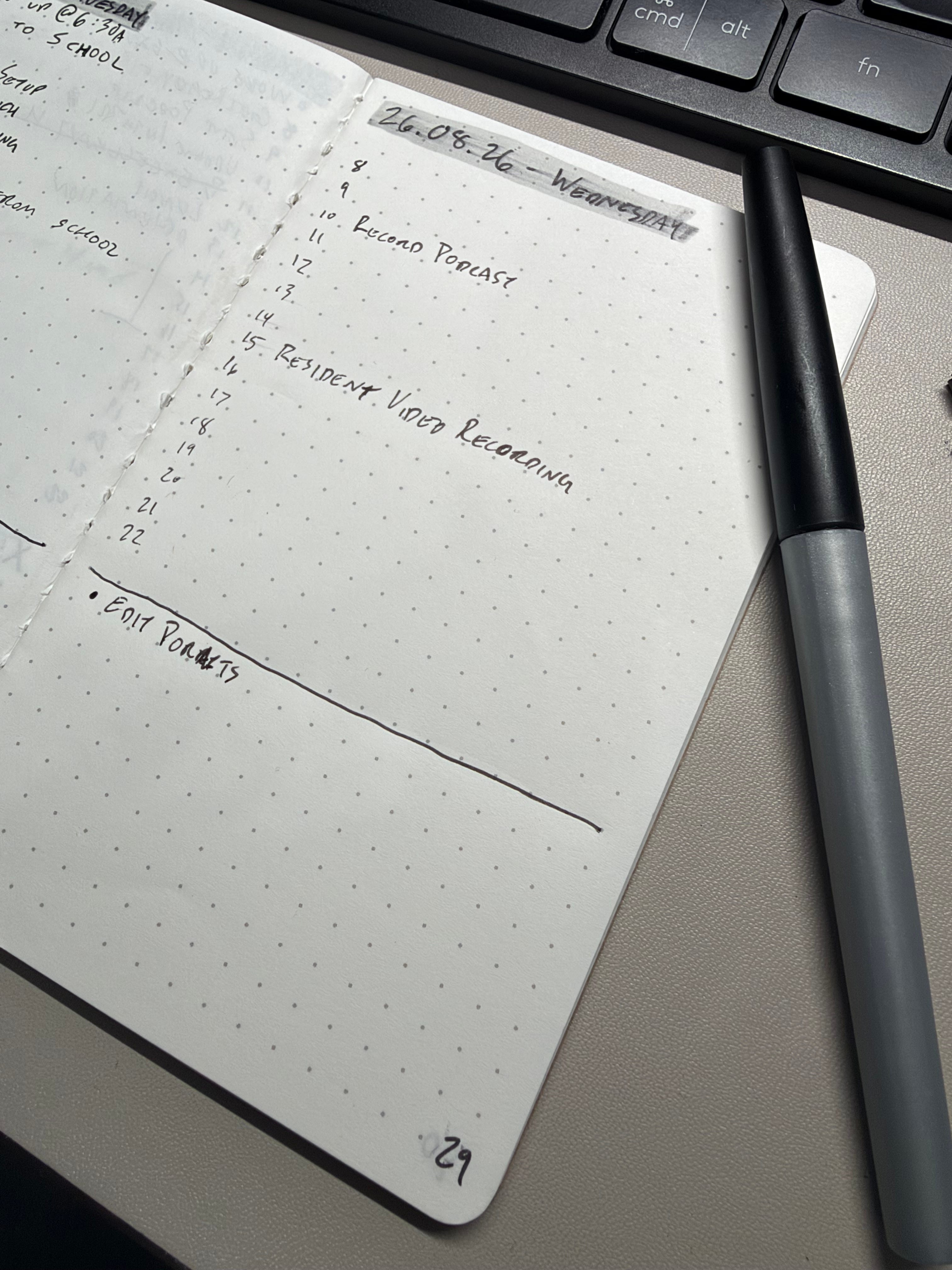
The hour column runs both directions, which is the part I didn’t expect to like. In the morning it’s a plan. By the afternoon it’s a log, because I write down what I actually did in that hour as the hour goes by. I don’t fill in every one. I keep up with the general shape of the day and that’s enough.
Two passes, not one
The morning pass at my desk is calendar events plus the tasks I already know have to happen. Five minutes, maybe less.
The second pass happens when I get to work. I open Todoist and my email, and I keep all my work notes in Notion, so anything from those that has to be done today gets added to the page. Work tasks show up in Todoist with an action date, and that’s a suggestion, not a verdict. If it has to be done today, it goes on the page. If not, I push it a day and it stays in the app.
That’s the whole filter. Does this have to happen today? If yes, it gets handwritten. If no, it stays digital.
Which means most of my Todoist list never touches paper. I’ve got a long tail of tasks in there I like checking off: read music news, listen to whatever Apple curated this week, vacuum the house, replace the burned-out bulb in the ceiling fan. Those are real tasks. They just don’t have to happen on any particular day, so they don’t earn the page. Nothing goes into the notebook that isn’t already in my calendar, Todoist, or Notion. That stack is the one I’ve been assembling piece by piece for years, and I’ve written about how I scavenged it together before.
The notebook is the last mile. Calendar, Todoist and Notion store the work. The page is what forces me to do it.
The part that makes it work is that it’s annoying
Every morning I also review the day before. I fill in gaps I missed and I migrate anything that didn’t get done.
Migrating means physically writing the task out again, in my own handwriting, on a fresh page. It bugs me every time. That annoyance is the entire mechanism. Rewriting the same unfinished task for the second morning in a row is irritating enough that I’d rather just go do it than write it a third time.
An app doesn’t do this. Todoist reschedules a task with two taps and no friction at all, which is exactly why I have tasks in there that have rolled forward for weeks and never once cost me anything.
I’ve written before that you don’t need more discipline, you need less friction. I still believe that for the capture side. Adding a task should be nearly free, and it is: I hold the Action Button on my iPhone and a Todoist task exists three seconds later, wherever I am.
But the doing side is different. The doing side needs a little friction pointed in the right direction, and rewriting a task by hand is about the right amount. That’s the bullet journal migration idea, and it’s the same thing James Clear is doing in Atomic Habits when he talks about making a habit harder or easier on purpose. Make the good thing obvious, make the avoidance cost something.
What I’m not going to oversell
I don’t always have the notebook on me at home. My workday hours are filled in properly and then things get thin after 5, and if the evening doesn’t get written I fill it in the next morning or I let it go. I don’t stress about it.
The page keeps me honest. It isn’t a compliance system, and it’s nowhere near the kind of bullet journal spread that ends up on Instagram (the photo up there is about as good as mine get). Mine has a Lochby pocket-size dot grid living inside a Lochby pocket journal cover with a pen, and it goes everywhere with me during the workday. That’s it. There’s no key, no index, no monthly log, no habit tracker.
I’m also not going to pretend the notebook made me organized. Todoist did that, about a decade ago. I’ve completed over 54,000 tasks in it, and I could not tell you the year I started, which is sort of the point: capturing everything in one place for that long is what stopped me dropping things. The handwritten page didn’t replace any of that. It got me from organized to actually finishing, which turned out to be a different problem than I thought it was.
If you’re skeptical
You should be. I was, for years, and my objection (I won’t always have it with me) was correct. I still don’t always have it with me.
Try it for a week anyway. Four or five tasks, written by hand, pulled out of whatever app you already trust. Physically writing them out helps me remember them, and more than that, it makes me pick them. Choosing something and writing it down is a different act than letting an app tell me what’s due.
And at the end of the week you get the thing no app has ever given me: a stack of pages with everything you actually did still visible on them.
Disclosure: This article contains affiliate links. If you purchase through them, I may earn a small commission at no extra cost to you.